
Keeping your Amazon catalog up to date is essential for maximizing sales and maintaining accurate product information. Flat files are a powerful tool for managing bulk updates efficiently, whether you’re adjusting prices, descriptions, or adding new products.
At Active Seller Hub, we handle large-scale updates using flat files, ensuring smooth catalog management with minimal errors.
Follow these steps on how to Update Your Amazon Catalog with Flat Files:
Option 1: Update Using the Category Listings Report
Step 1. Download the Category Listings Report
-
Log in to Amazon Seller Central and go to Reports → Inventory Reports.
-
Select Category Listings Report from the dropdown
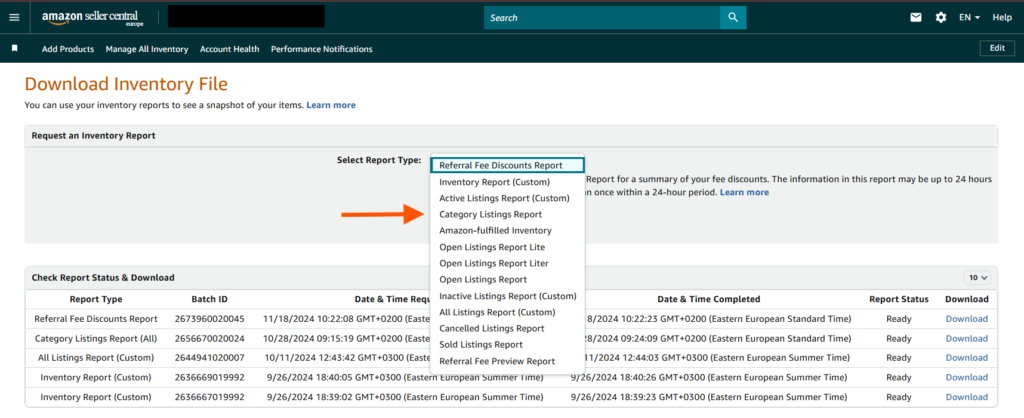
- Select Listings Category from the dropdown or select “All” to download your entire catalog’s report, which provides an organized view of your listings.
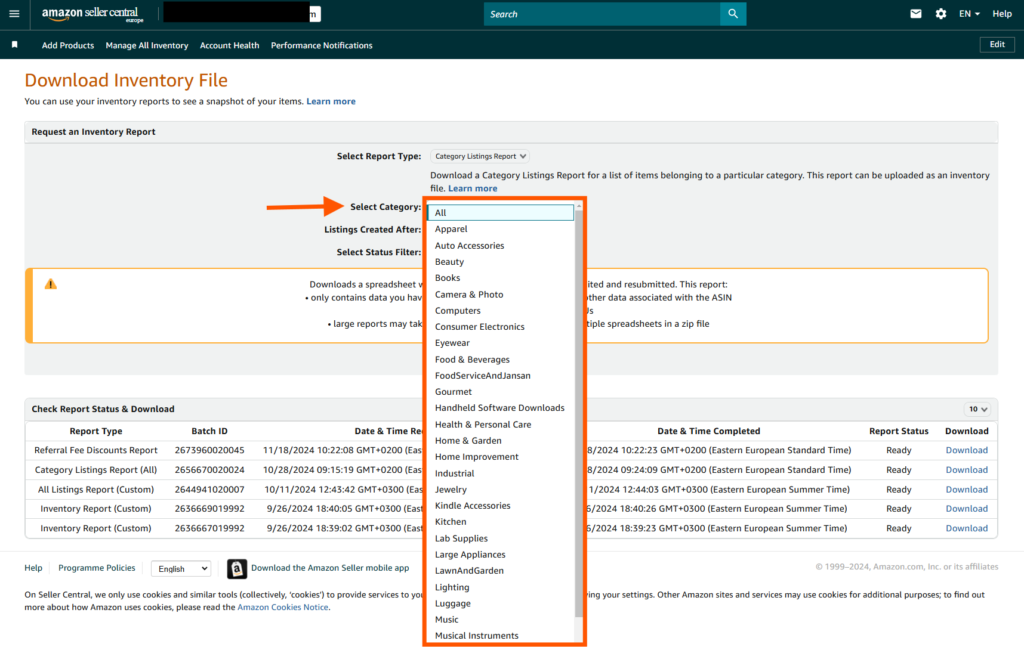
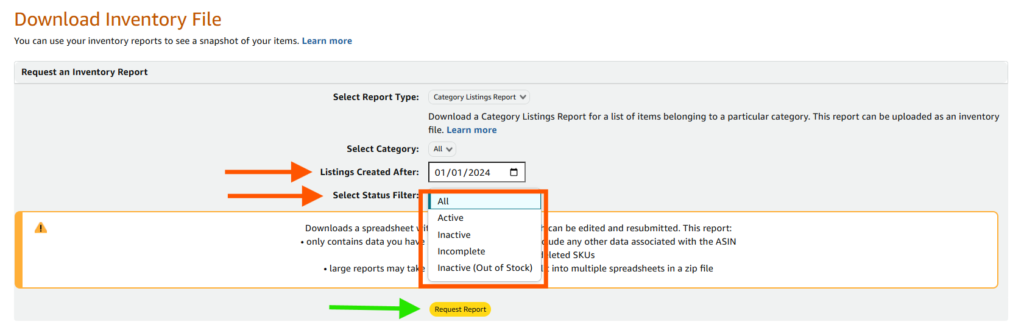
- Select Status Filter Options if you want to generate reports based on a specific listing status.
-
Once all fields are complete, select Request Report. A report will be generated in the below lists for you to download.
-
Download the report, which contains your entire catalog and provides a comprehensive overview of your listings. Keep this stored, because if you make any serious mistake with the flat file, you will be able to use the Category Listings Report to restore the values.
-
You can use the Category Listings Report as a flat file by removing all the rest of the products from the sheet and keeping only the one you want to update.
Step 2. Fill Out the Flat File
- Open the downloaded file and go to the Template tab.
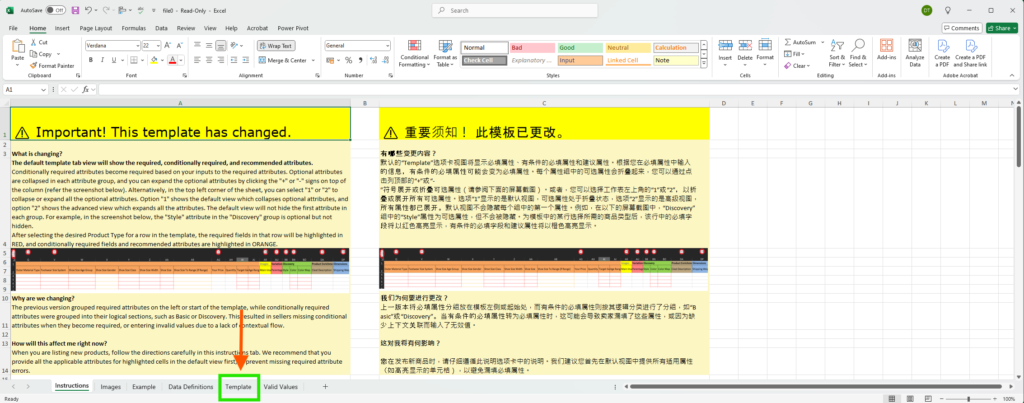
-
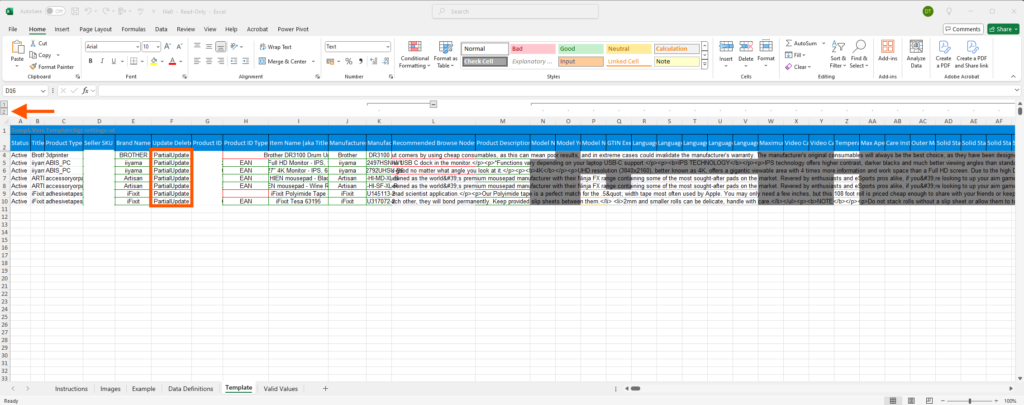
Unhide all columns by selecting the sheet and choosing “Unhide All” for a complete data view.
-
Use CTRL + F to locate specific listings or attributes you need to adjust. Set Partial Update in the “update_delete” column if you only want to modify specific attributes (such as title, pricing, or descriptions).
Option 2: Use a Flat File Template for New Listings
Step 1: Download the Listing Loader Flat File Template
-
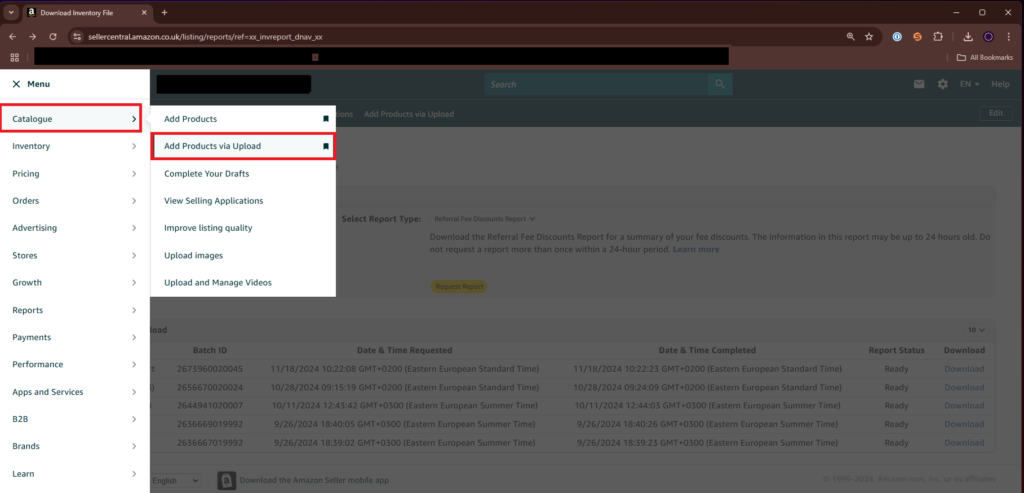
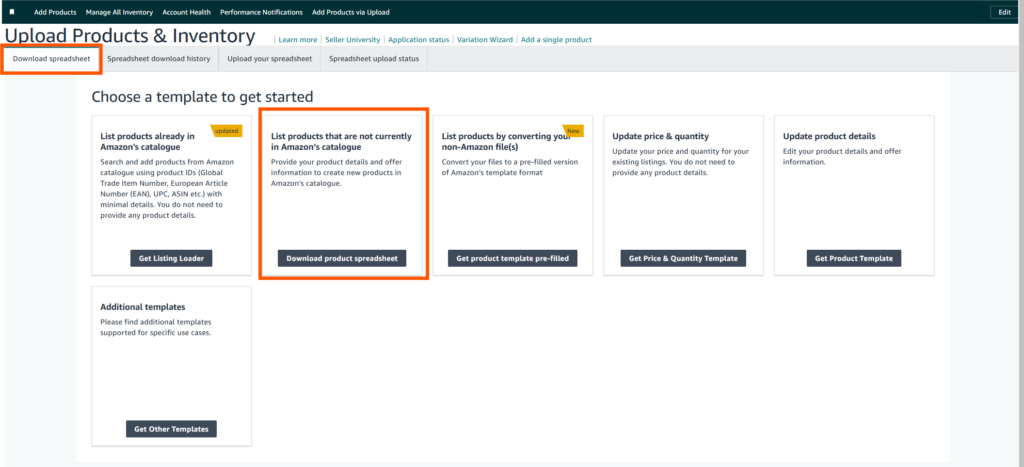
In Seller Central, go to Inventory → Add Products via Upload → Download Product Spreadsheet.
-
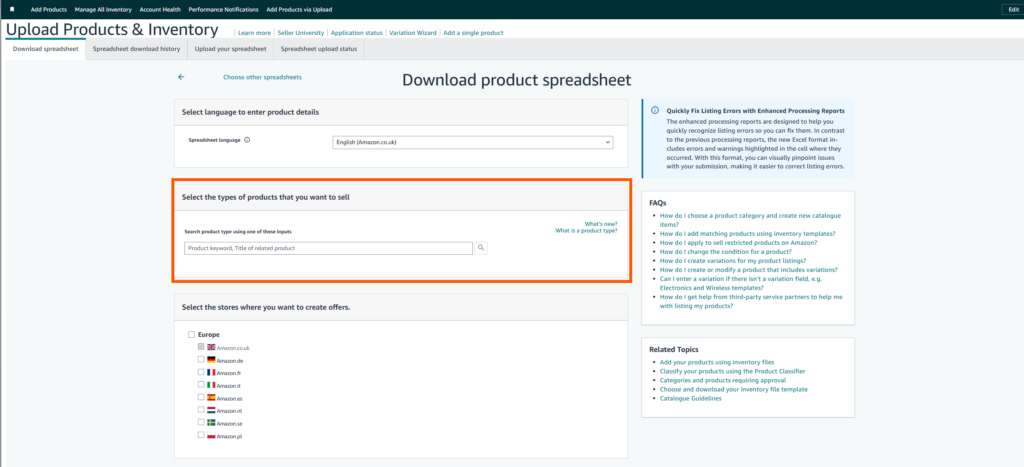
Use keywords like “outdoor lanterns” or “wine glass” in the search box to find the appropriate template for your category.
-
Click Select and then Generate Template to download your category-specific flat file.
-
Use keywords like “outdoor lanterns” or “wine glass” in the search box to find the appropriate template for your category.
-
Once the desired category appears on the search, Click Select and then Generate Template should appear at the bottom of the page to download your category-specific flat file.
Tip: If you already have similar listings, refer to the Category Listings Report to help populate the new flat file with product-specific details.
Step 2: Fill Out Your Flat File
- Open the flat file and go to the Template tab.
-
Unhide all columns to ensure full data visibility by selecting the [+] icon above the A column or by selecting the entire sheet (click the box between column A and row 1) → right-click → Unhide All.
-
Use CTRL + F to search for specific listings or attributes to update, add, or delete.
-
Select “Partial Update” from column “update_delete” if you just want to update a few attributes.
-
Note that even in Partial Updates there are certain attributes that you must fill these are usually:
- Product Type
- Seller SKU
- Brand Name
- Update Delete
- Product Name
- Manufacturer
- Product ID
- Product ID Type
- Item Type Keyword
Step 3: (Optional): Adding Product Variations
If you are creating multiple variations of a product (e.g., different sizes or colors), you’ll need to configure the variations in your flat file.
For more detailed instructions, see our article on Creating Product Variations Using Flat Files.
Step 4: Upload Your Flat File
Once you’ve filled in the flat file, it’s time to upload it to Seller Central.
- Save the flat file with a recognizable name, such as “[Product_Model]_v1.” This will help you easily find the file in the future.
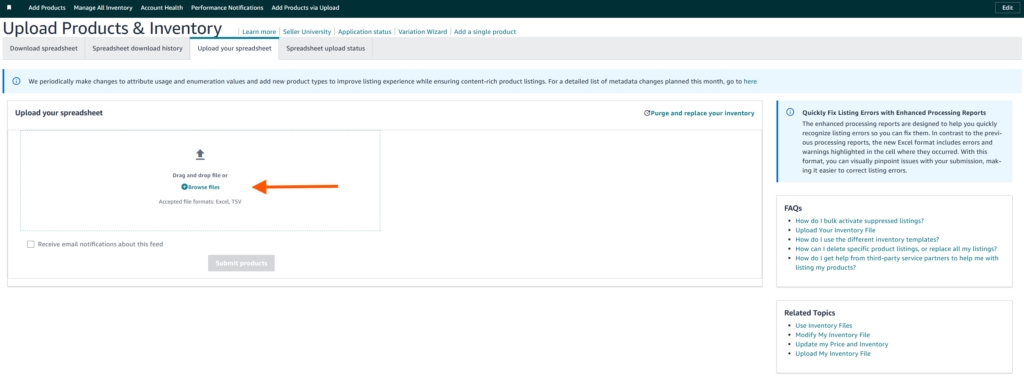
- Navigate to Inventory → Add Products via Upload → Upload Your Spreadsheet.
- Browse for your saved file and upload it. Monitor the status under Spreadsheet Upload Status.
- If your “Upload Status” says “Records that require further action from you are saved as drafts” then you need to fix certain fields in your Template.
- Choose to Download Processing Report and check tabs:
- Feed Processing Summary
- Template
- You can then fix any obvious errors like missing information or information put wrongly to your original Flat File and re-uploaded.
If the Flat file is successful still you don’t see everything under Manage Inventory, wait for at least 2-3 hours to see if the listing was created regardless otherwise you need to go to support.
Tip: It’s common to encounter errors after uploading a flat file. This is part of the learning process, so don’t be alarmed. Fix any errors by reviewing the feedback and re-upload the corrected file.
Step 5: Troubleshooting Amazon flat file errors
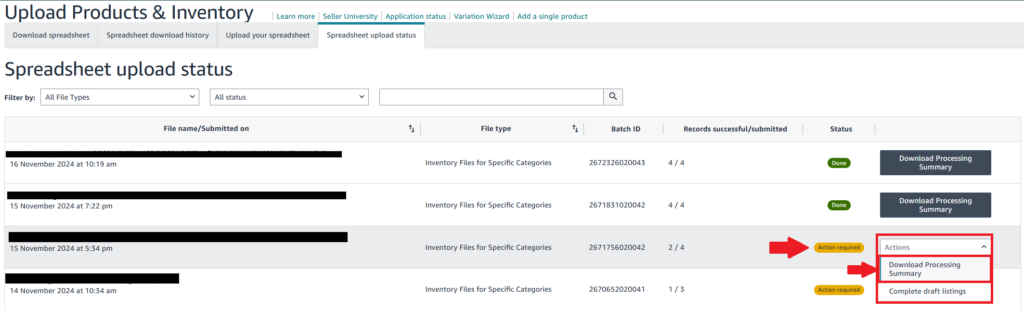
Flat file uploads can sometimes result in errors. In this case, you can download the Processing Summary by going to Spreadsheet upload status and selecting the flat file which had the error and select “Download Processing Summary” in the “ Actions” Dropdown button.
Here are some common issues and their solutions:
-
Missing Fields Error: Ensure all mandatory fields, such as ASIN, SKU, product name, and category, are filled in.
-
Invalid Data Format: Check for special characters in numeric fields (e.g., price, quantity) and correct them.
-
Category Misalignment: If your product isn’t appearing in the right category, review category-specific guidelines and adjust the product data accordingly.
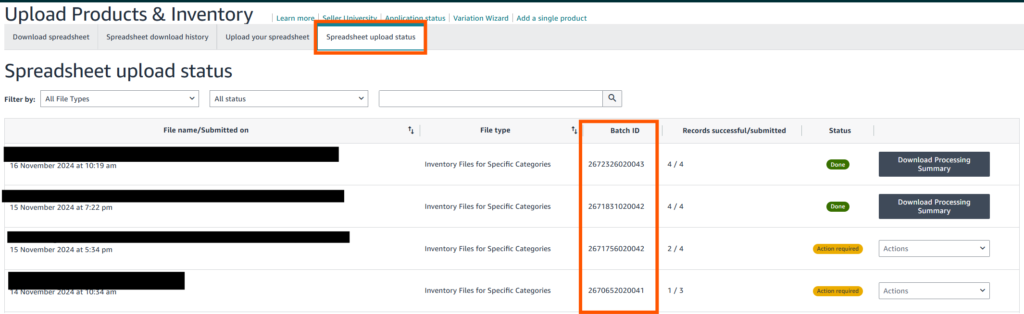
Note: If the issue persists, contact Seller Support and provide the Batch ID found under the Spreadsheet Upload Status.
Best Practices for Amazon Flat Files when Creating ASINS
1. Fill-In as Much Product Information as Possible: When creating a new Product it is important to make sure you fill in as many product descriptions and specifications as possible in order to get the most engagement in your listing from amazon shoppers. Leaving out many product descriptions can lead to shoppers questionable if the product is the right choice for what they need or looking for.
2. Keyword Optimization: Include relevant keywords in your product title, description, and bullet points to improve visibility. Use tools like Helium 10 or Amazon’s own search tools to identify high-traffic keywords.
3. High-Quality Product Images: Make sure to upload images that meet Amazon’s guidelines for size and clarity. High-resolution images with a white background are essential for better conversion rates.
4. Compliance with Amazon Guidelines: Ensure that your products comply with Amazon’s policies regarding restricted items, product authenticity, and safety standards.
Conclusion
This guide on How to update Your Amazon catalog with flat files is aimed to help increase efficiency when managing catalogs for amazon sellers. Amazon Sellers that have a lot of products and need to make bulk updates can save a lot of time and minimize errors when using flat files instead of manually editing each listing one at a time.
Also when creating new ASINs for your products doesn’t have to be a complicated process. By following the steps outlined above, you can ensure your products are listed correctly, avoid common errors, and improve their discoverability on Amazon. Optimizing each step—from filling out the flat file to troubleshooting errors—will save you time and boost your product’s success on the platform.
By adhering to these best practices, you can streamline the listing process and set your products up for long-term success in the competitive Amazon marketplace.
Share:
More Posts

Amazon A+ Content Optimization: The Ultimate Guide to Growing Your Sales
With over 9.7 million sellers on Amazon, standing out from

Amazon Competitor Research: A Complete Guide for Sellers
In the crowded marketplace of Amazon, Amazon competitor research is

How to Use Bulk Operations for Amazon PPC Optimizations
Amazon PPC Bulk Operations is a powerful tool for managing and

Amazon FBA Grade and Resell: Everything You Need to Know
The Amazon FBA Grade and Resell program has emerged as

Amazon’s New Product Title Requirements Effective January 21, 2025: What Sellers Need to Know
Amazon has announced an update to its product title requirements, aiming to

Amazon Account Suspension: 10 Reasons Why It Happens and How to Avoid Them
Amazon account suspension is one of the most challenging setbacks

Protect Your Brand on Amazon: Tips and Strategies for Success
Amazon is the largest online marketplace, offering unparalleled opportunities for

The Best Amazon Advertising Strategies – Lower ACoS, Boost Conversions, and Increase Sales!
Amazon advertising is a game-changer for sellers looking to increase
Send Us A Message
Full Name
Phone
Send
PrevPreviousHow to Find Amazon Micro-Influencers for Your Brand: A Complete Guide
NextIs Your Amazon ACoS Really Accurate?Next
[ \
\